



Lighting is one of the most important factors in passport photography, yet it is also one of the most underestimated. A photo may have the correct dimensions, proper background, and accurate alignment, but poor lighting alone can still cause rejection.
Government agencies and biometric verification systems require passport photos to present the face clearly and consistently. Uneven lighting, deep shadows, glare, or excessive brightness can interfere with facial recognition and reduce image quality.
This guide explains how to create the best lighting setup for passport photos at home, how shadows form, why lighting affects compliance, and how to achieve professional-quality results without expensive equipment.
Why Lighting Matters in Passport Photos
Passport photos are not evaluated like ordinary portraits. They are processed as identification images that must preserve facial details accurately.
Lighting directly affects:
Facial visibility
Skin tone consistency
Edge detection around the face
Background uniformity
Biometric systems rely on clear contrast between facial features and the surrounding environment. If shadows obscure parts of the face or if highlights become too bright, important facial data can be lost.
This is why lighting standards exist. The goal is not aesthetic quality, it is technical clarity.
What Causes Passport Photo Rejections Related to Lighting
Lighting-related rejections usually happen because the image contains uneven exposure.
Common issues include:
Shadows behind the head
One side of the face brighter than the other
Harsh overhead lighting
Bright hotspots on the forehead or cheeks
Reflections from glasses
In many cases, these problems are subtle and may not appear serious to the user. However, automated systems detect inconsistencies more precisely than human reviewers.
Even small lighting imbalances can affect how facial features are interpreted.
The Ideal Lighting Goal for Passport Photos
The objective is to create soft, even illumination across the entire face and background.
A properly lit passport photo should:
Preserve natural skin tone
Eliminate strong shadows
Avoid overexposed highlights
Maintain clear visibility of facial edges
The face should appear balanced from left to right, with no dramatic contrast or directional lighting effects. Unlike artistic photography, passport photos should look neutral and technically consistent.
Natural Light vs Artificial Light
Both natural and artificial lighting can produce compliant passport photos if used correctly.
Natural light is often the easiest option because it provides soft and even illumination, especially near a window during daytime. Indirect daylight tends to create smoother shadows and more accurate skin tones.
However, direct sunlight should be avoided because it creates harsh contrast and strong shadows.
Artificial lighting can also work well, but it requires more control. Single light sources often create uneven illumination, while poorly positioned lights can introduce glare or shadows.
The key is not the type of light, it is how evenly the light is distributed.
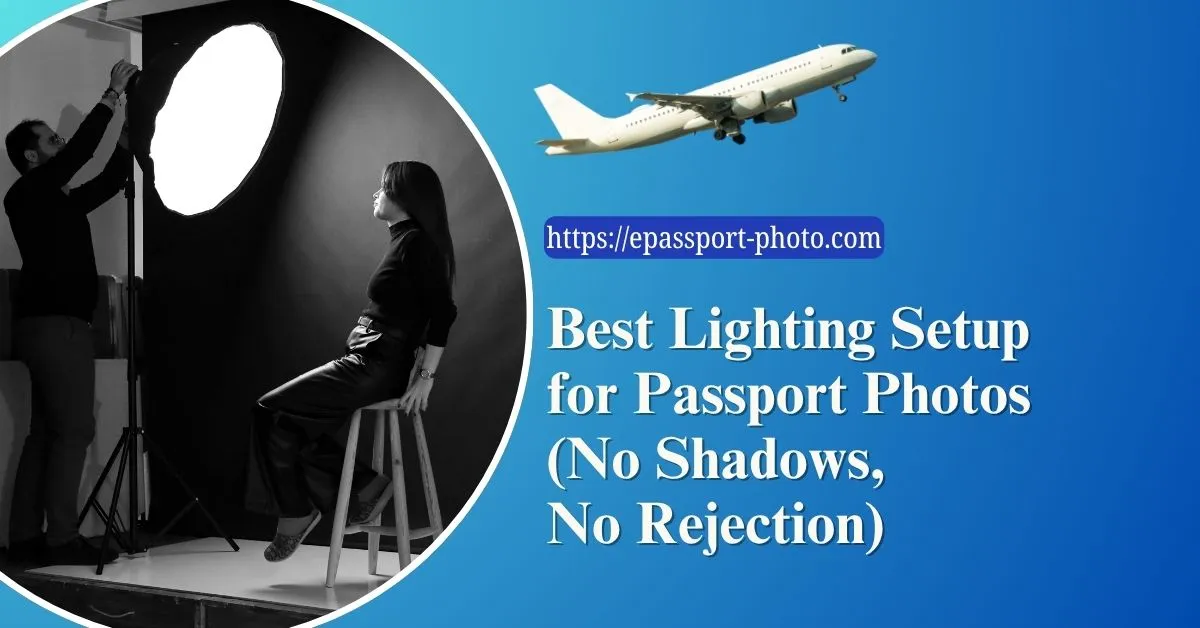
Best Lighting Setup for Passport Photos at Home
A simple two-light setup is usually sufficient for compliant passport photos.
The subject should stand facing the camera with:
One light positioned slightly to the left
One light positioned slightly to the right
Both lights should be placed at approximately face level and angled softly toward the subject. This arrangement reduces directional shadows and balances facial illumination.
The subject should also stand a short distance away from the wall. Standing too close causes shadows to appear directly behind the head, which is one of the most common rejection reasons.
Why Overhead Lighting Causes Problems
Many users attempt to take passport photos under ceiling lights. While this may seem convenient, overhead lighting creates downward shadows under the eyes, nose, and chin.
These shadows distort facial geometry and reduce clarity. Overhead lighting also creates uneven brightness across the face, particularly on the forehead and upper cheeks.
For passport photos, lighting should ideally come from the front and sides rather than directly above.
How Background Shadows Form
Background shadows occur when the subject blocks light from reaching the wall behind them.
This usually happens because:
The light source is too directional
The subject is standing too close to the wall
The solution is simple:
Increase the distance between the subject and background
Use softer, more diffused lighting
Even a small amount of separation can dramatically reduce shadow intensity.
Soft Light vs Harsh Light
Soft lighting produces gradual transitions between light and shadow, while harsh lighting creates sharp edges and strong contrast.
Passport photos require soft lighting because:
It preserves facial detail
It prevents deep shadows
It maintains even skin tones
Soft light can be achieved by:
Using indirect daylight
Placing a thin white curtain over a window
Diffusing artificial light through fabric or softboxes
The goal is to spread light evenly rather than focus it intensely.
Common Lighting Mistakes in Smartphone Passport Photos
Smartphones are fully capable of producing compliant passport photos, but lighting mistakes remain common.
Users frequently:
Use camera flash directly
Stand under ceiling lights
Take photos in dark rooms
Mix warm and cool light sources
These mistakes produce inconsistent color temperature and uneven exposure. Using natural daylight or balanced front-facing lighting produces significantly better results.
Why Camera Flash Should Usually Be Avoided
Direct flash creates:
Harsh facial highlights
Flat-looking skin tones
Bright reflections on glasses
Strong background shadows
While flash can increase brightness, it often reduces overall image quality for passport purposes. Continuous lighting or daylight provides more controlled and natural results.
Lighting and Facial Recognition Accuracy
Lighting affects more than appearance, it directly impacts biometric processing. Facial recognition systems analyze eye contours, nose shape, jawline edges, and facial symmetry.
Uneven lighting can obscure or exaggerate these features, reducing recognition accuracy. This is why government guidelines emphasize uniform illumination across the face.
Fixing Lighting Problems After Taking the Photo
Minor lighting issues can sometimes be corrected through post-processing. Adjustments may include balancing brightness, reducing mild shadows, and correcting exposure.
However, severe lighting problems cannot be fully fixed without degrading image quality. If the face contains deep shadows or strong overexposure, retaking the photo is usually the better option.
Creating a Compliant Photo After Capture
Once the image is captured under proper lighting, it still needs to meet official formatting requirements. This includes correct dimensions, head size alignment, eye positioning, and background consistency.
Platforms like Epassport-Photo help standardize these elements automatically after upload, ensuring that the final image meets official requirements while preserving the original lighting quality.
Practical Workflow for Proper Passport Photo Lighting
A structured workflow minimizes rejection risk:
Choose a plain white background
Use soft front-facing lighting
Avoid direct sunlight and flash
Position the subject away from the wall
Capture multiple images
Upload the best image for formatting and validation
This process creates a technically balanced image suitable for passport and visa applications.
Conclusion
Lighting is one of the defining factors in whether a passport photo passes or fails official checks. A properly lit image preserves facial detail, maintains natural contrast, and ensures compatibility with biometric verification systems.
By understanding how shadows form and how light affects facial recognition accuracy, users can create compliant passport photos at home without relying on expensive studio setups. Combining correct lighting with structured formatting and validation significantly reduces rejection risk and improves overall photo quality.
Visit EPassport-Photo
Download the App | Android | IOS |
Frequently Asked Questions (FAQs)
What is the best lighting for passport photos?
Soft, even front-facing lighting with minimal shadows.
Can I use natural light for passport photos?
Yes. Indirect daylight is often ideal.
Why are shadows behind the head a problem?
They interfere with background consistency and facial edge detection.
Is camera flash allowed?
Technically yes, but direct flash often creates glare and harsh shadows.
Can lighting issues be fixed digitally?
Minor issues can be corrected, but severe lighting problems usually require retaking the photo.